I swear the blog isn’t dead. Really, I swear. I just don’t update it enough. So here, have an update.
My partner and I have a constant problem: we both enjoy cooking and making food, but we’re both incredibly bad at figuring out what we want to eat for dinner. Or making mundane decisions like that at all, really. We’ll pass the decision off onto each other for sometimes an hour (obviously talking about other stuff in the meantime) without ever actually deciding on something. Neither of us want to step on the other’s toes.
So much food, but nothing to eat
To add to, or maybe help clear up, the difficulty, we have started signing up for a CSA from a local community farm. A CSA, or ‘Community Supported Agriculture’ program, is basically a way to ‘subscribe’ to a share of a harvest throughout a season - you pay some price up front, and every week or two you get a selection of farm products, mostly vegetables, to take home. Check the link for more info and to find one local to you - there’s probably one nearby.
Anyway, this results in us having a large selection of vegetables, not to mention the other ingredients we either pick up while we’re at the farm or purchase through the week to use or freeze. However, unlike a normal weekly shop where you might come up with a list for all the meals you plan to cook in a week, our ingredients change from week to week and some are not ingredients someone might ’normally’ pick up, it’s just whatever the farm is giving us that week.
Every night we would look in our kitchen and ask ourselves, “what do we do with carrots, sweet potatoes, shallots, an onion, some turnips, celery root, and daikon radish? What CAN we do with even some of it?” Sure, it’s a first world problem, and a nice one to have at that, but it’s still a problem for us - if we don’t use the ingredients they’ll go bad, but if we don’t know how to use them we won’t.
First world problems call for first world solutions
Eventually one of us would give up, break out ChatGPT or Claude, give it a list of ingredients and some basic instructions to give us meal ideas and general cooking guidelines. That made it easy to just pick one and go. And despite all the doom and gloom around AI - future blog post on that later, maybe, possibly, if-I-remember-since-I’ve-been-meaning-to-write-it-for-over-a-year-now - it works quite well.
There’s a catch to this, though. Well, really two. The first is that we both know how to cook. We don’t need a recipe to know how to make something - we just need a list of ingredients, maybe a ratio or two, and the general steps to get from point A to point B. We need a map, not GPS navigation. This means we’re both able to take the results from these AI models and understand what to do, what to change, what to add, and what to ignore - we don’t follow them blindly.
The second problem is the annoying one though. These models don’t have the ability to just know what’s in our kitchen, we have to tell them. Each time. Sure, we can keep a long-running chat going and just tell it what we’ve added and removed, but context rot is a real problem and that frankly just gets tedious.
Not to mention, wouldn’t it be nice if we could use our own recipes when we have all, or at least most, of the ingredients for them?
Let’s address the elephant riding a bicycle first
“No! You should find REAL recipes written by REAL people and use those, not one that an AI stole!” is an argument that I 100% expect to hear made. I can think of a few people I know who will probably make that argument if they read this. If we ignore all of the fallacies and misunderstandings in that one statement and get to the crux of the issue in this case: Pre-Gemini, Pre-Bard, if you were to hop onto Google and try to search up recipes for the ingredients you have, what do you think you would get? Better yet - what ingredients do you even search for? You’re not going to use your whole pantry in one meal, gotta pick some…and now you have the same problem as before. Only interested in one or two ingredients? Search them up - do you have everything for those recipes, or are you going to go out and buy something new just to use up this one ingredient? Those are the problems we’re trying to solve.
I plan to write a longer blog post in the future (referenced 5 paragraphs ago!) about my thoughts around AI and how it can and should be used. Suffice to say I think people who call everything “slop” and dismiss AI out of hand without stopping to think about it are just as disingenuous as the folks pushing for it to be implemented in every aspect of life and think that it’s best thing ever. Nuance, as it seems, is hard for many.
To be clear: the only AI that touched this blog post was a spellchecker and grammar checker, and I mostly ignored the latter.
Enough about that though, let’s get on to the food!
Complex is simple. Simple is complex.
This is not going to be a guide to do what I did, but you might be able to get to the same place with some searching around. With that said, let’s introduce our players!
Mealie is the source of it all! This is a self-hosted recipe management database that, critically, also has a food database. The food database can be used to store if you have something or not, along with additional metadata. This hits our needs perfectly: we want to know what we have, but we don’t care about how much. Something like grocy is far too complex for what we need. Something like Paprika is great (and in fact is what we have been using), but doesn’t work well in a shared household, it’s better for individuals. Mealie, despite some UI quirks, fits the bill well.
n8n is how I keep myself from going insane by writing everything in Python! Theoretically, anyway - the reality is it’s just a different level of insane. It’s a great automation tool and is fairly popular (despite some rather troubling security issues). It’s great for little bits of automation like this because it means I don’t have to manage a whole environment for each one. I’m not super concerned about security issues as long as I keep it local. Speaking of local,
Ollama for AI! Yup, we’re using a local model, specifically glm-4.7-flash right now, to handle most of the AI shenanigans. We don’t need something as robust as ChatGPT, Gemini, or Claude, so there’s no reason to set up API access and deal with paying per-token. Instead I’ll just use my own electricity and compute, thank you. This does slow us down a bit, but not enough to be concerning - we’ll get there.
Claude! Didn’t I just say I was doing local AI? Yes! Claude helped me put everything together. Could I have figured this all out myself? Absolutely. Could I have done it in 2 or 3 days, while also watching anime and YouTube? Probably not. Plus, we have a little extra bit at the end where Claude will come in handy…assuming I don’t blow past my limit again.
The supporting cast: macOS - this all runs on a Mac Mini. Tailscale - gotta keep things off the outside internet (remember those security issues?). Docker and compose - that’s how we’re deploying most of this. Colima - Easier than Docker Desktop when connecting to the Mac Mini over SSH. Also it’s just friendlier. Caddy - SSL, Reverse Proxy, etc. - the normal homelab front door requirements. tailscale/golink - Golinks make it easy to get to these workflows without having to remember annoyingly long n8n URLs. Plus the rest of my homelab - it’s all working together here to…help me decide if I want pasta or rice.
What’s the end goal? Easy: A simple form to say what we have and don’t have, and a button to generate recipe ideas - or find substitutions for recipes we have - based on that. Plus a few minor bonus features. A lot of components for a very, very simple interface. So where do we start?
What food is on hand?
So, let’s talk about Mealie. It’s really a recipe manager, it’s not really designed for your food inventory. Sure, the function is there, but it’s…well…
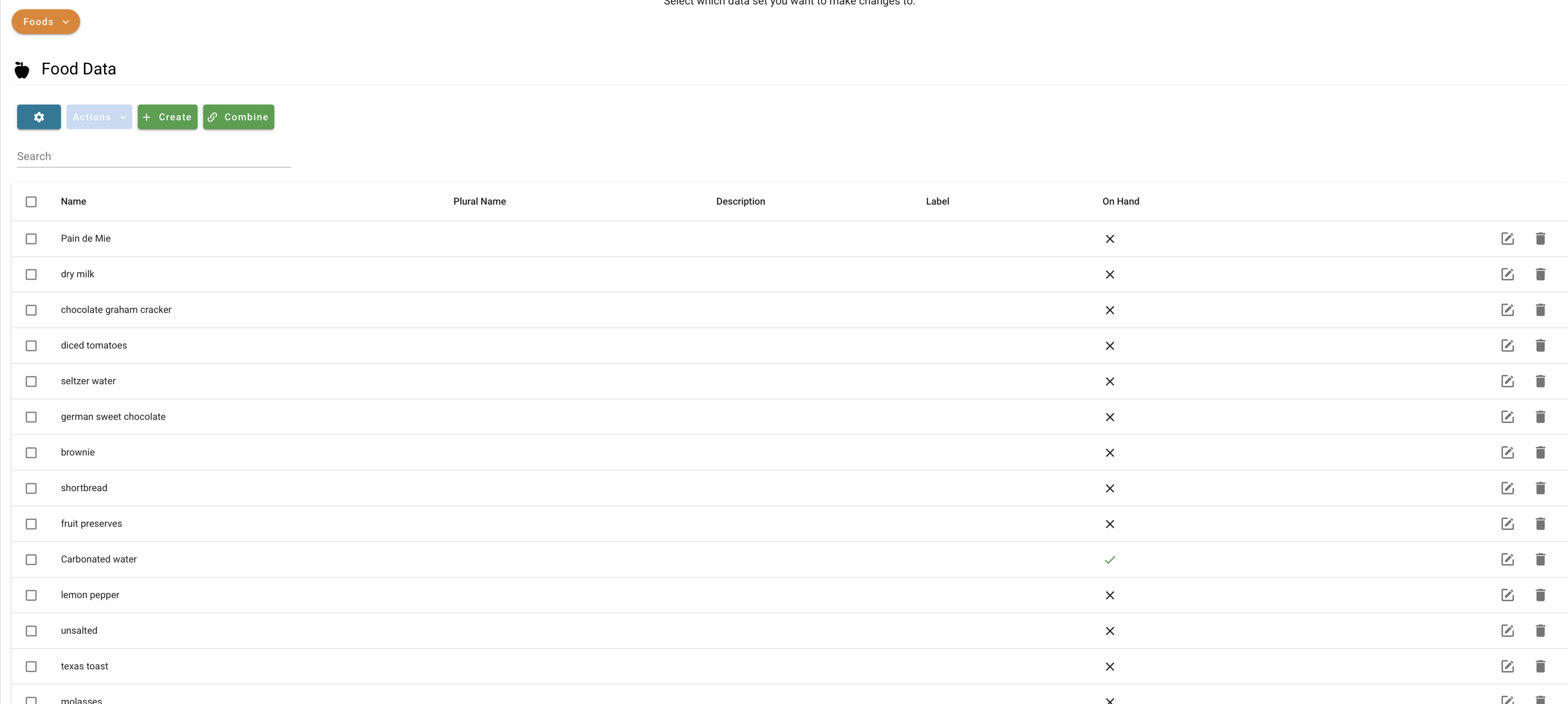
Yeah, this is it. There's no other interface, really.
Not exactly the most ideal, to be sure. Adding food and marking things as “on hand” is a bit cumbersome, not to mention this interface was nearly impossible to find. Their docs don’t mention it at all - I had to ask an AI where the page was, and it only found it after digging through the GitHub Issues! Pro tip - the food database is in Settings > Data Management, if you’re ever looking for it. Yeah it makes some sense in hindsight, but geez what a pain to find.
Aaaaanyway, there’s something this interface doesn’t even do which is quite important to me: mark where the food is. Is it in the pantry? The freezer? The fridge? This is important for knowing how feasible it is to actually make the food. If we’re doing grilled chicken breasts, the chicken had better be defrosted. This is done using extra metadata, but the Mealie UI doesn’t provide any way to modify that.
Also, let’s talk about importing recipes here. As I mentioned earlier, my partner and I both use Paprika on our phones to keep track of recipes. That’s fine, Mealie has an import tool and paprika has a bulk export tool, so moving between them is easy! But you know what Mealie doesn’t do? It doesn’t parse the ingredients for you on import! This is important, because Mealie will only expose a recipe as having any ingredients in the API if it’s parsed the ingredients and they match a food in it’s food database. On top of that, there’s no bulk parse feature! This means I had to go through all of my recipes - thankfully only about 100 in my own database - and manually parse them. And on nearly every recipe, there was some ‘ingredient’ it didn’t recognize, like “all-purpose flour” which isn’t “unbleached all-purpose flour,” the only all-purpose flour it has in the database by default. Or “ground cinnamon” which isn’t “cinnamon.” Most annoyingly, things like “all-purpose flour, weigh your flour or use the ‘fluff and sprinkle’ method and level it off” were also misinterpreted as a single, long ingredient. Parsing each recipe and correcting them all: this was the height of tedium.
Plus…the UI would mess up the ingredient order every so often, so sometimes things just got missed or moved around in weird ways. Suffice to say, I wouldn’t recommend Mealie to anyone who just wants a “set-it and forget it” self-hosted recipe manager. Too many bugs right now.
Now everything is parsed. How do we make updating food better? If it’s always a pain, we never will. Enter n8n.
Knowing is half the battle
In order for the AI to be able to come up with ideas for us, we first must provide it with knowledge - in this case, the knowledge of what ingredients we have on hand. The memory storage is Mealie, which we’ve already talked about, but getting info into mealie is not easy, at least, not with it’s own UI. So this is where the first n8n automation comes in.
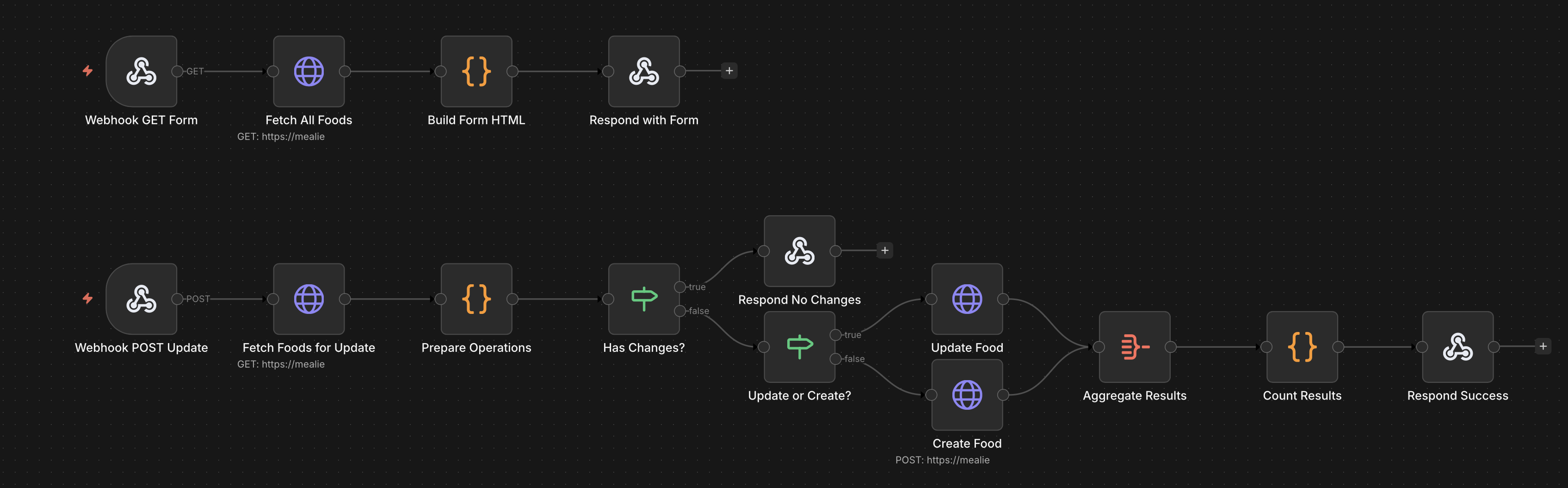
Not much to look at, but this is where the inventory magic happens. Oh, and it was night when I took most of these, so expect lots of dark images.
Here’s how it works. First, you hit an endpoint, which I have conveniently go-linked to go/food. That endpoint talks out to Mealie to get a list of all of the food Mealie knows about, and what is and isn’t on hand.
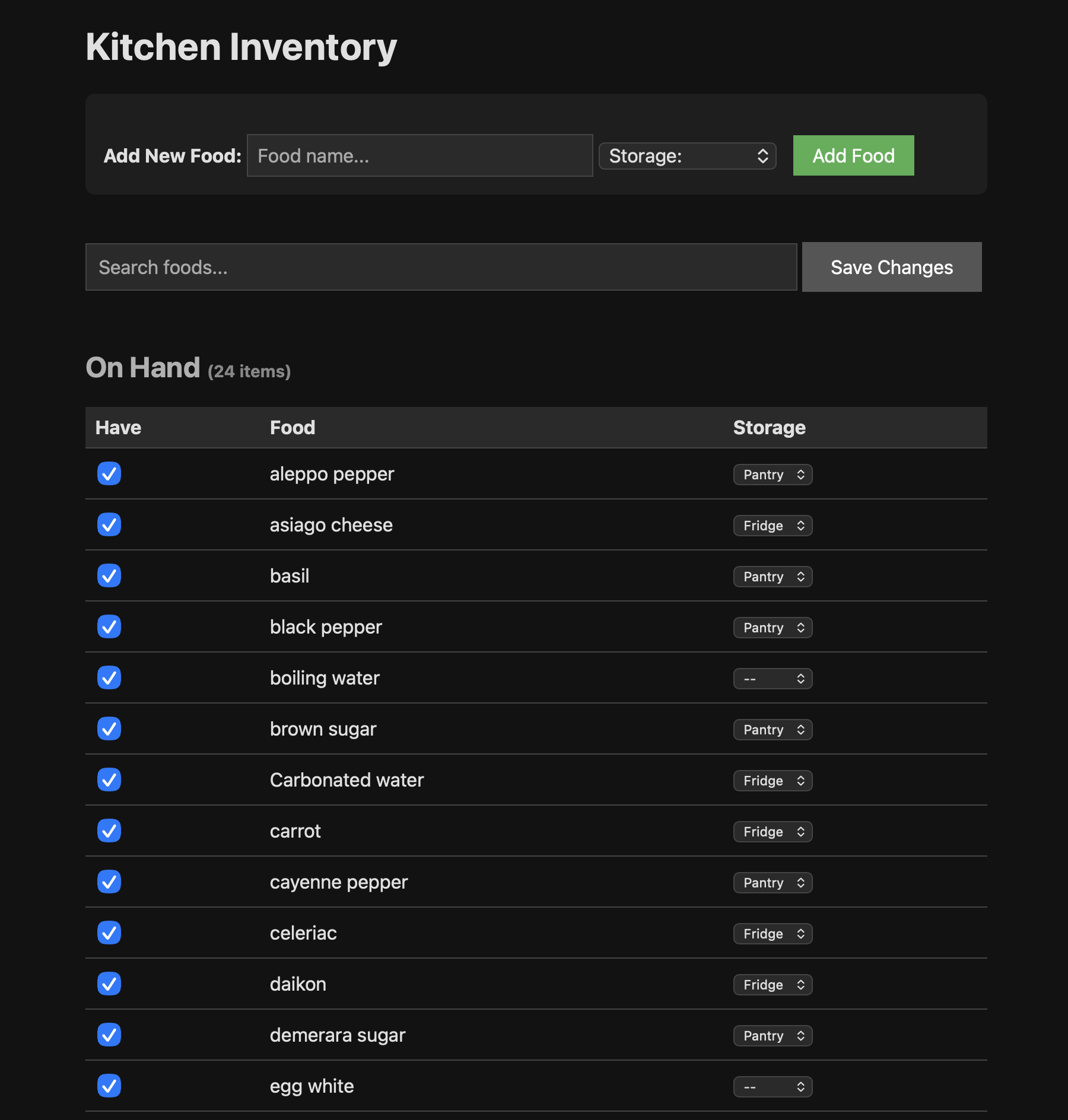
I'm still working on the CSS. You can't see them, but 'Not On Hand' foods are at the bottom. And yes, I have more then 24 ingredients in my kitchen, I haven't finished out the inventory yet.
At the end, the endpoint presents the above form. We can use the search box to look for food, mark them as ‘On Hand’ or unmark them as such, and specify where they’re currently stored - important for later. Whenever we change something and hit “Save Changes,” the second half of the workflow runs to update the food in Mealie.
You might notice something weird though, if you look closely - the update half of the workflow starts with ‘Fetch Foods for Update’, what’s that about? It turns out this is another gotcha in the Mealie API. You can’t just change one or two fields in a food entry, or expect PUT-ing only the changes to only change the food, even if you have the food’s ID. You have to change all of the fields at once, otherwise anything you don’t change gets blanked out and set to default. Of course, listing all of the food like we did in the first half doesn’t get all of the food’s information either, which means we have to request each changed food item a second time just to get it’s current state so that we can update it! Crazy, right?
You’ll also note some …I’ll call them unique, foods listed even in the simple list above. This is another Mealie consequence. If we have water, but the recipe calls for boiling water? Well, ‘boiling water’ is not ‘water’, so you don’t have that ingredient, unless you bother to go through and change all of your recipes that call for ‘boiling water’ (which is the normal term) to actually call for ‘water, boiling’ in two separate fields. Same deal for things like egg white vs. egg yolk vs. egg. It’s easier to just create the extra ingredient and deal with them all separately, Mealie is pretty limited in how it handles ingredients, unfortunately.
But, well, okay. So now we have an inventory of food. It’s a little annoying to keep up to date, but it’s there, at least. What’s next?
Hearty Fried Wild Greens, or Dubious Food?
Now it’s time for the real magic - the n8n workflow that actually figures out what we can make! Let’s take a look at the actual flow:
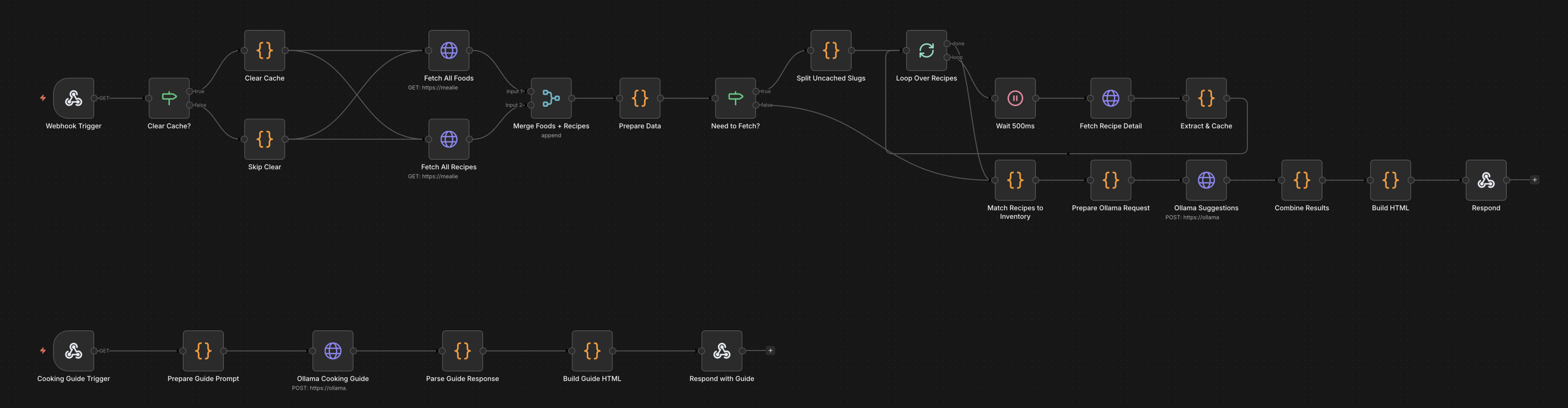
This one is a bit more complicated then the last one. But how else are you going to know if you want an omelette or a fried egg?
So what’s all of that doing? Well, the top half is what happens when we hit go/cook. What’s going on there? In brief:
- It gets a list of all food and all recipes from Mealie.
- It fetches each recipe again, because Mealie doesn’t provide an ingredient list if you just ask it for all recipes. It does this in batches of 5 to minimize API calls, otherwise Mealie overloads it’s database connection pool and just completely crashes. No recovery, just gone. You have to manually restart the container.
- Because this takes about a minute on its own, it caches the recipes in the workflow. Recipes and ingredients don’t change that often, and it’ll pull new recipes if there are any.
- It then determines what recipes we have all of the ingredients for and which ones we have 70% or more of the ingredients for.
- It passes that info, along with the full list of food we have, to Ollama - which hosts the local AI model - for processing. The AI model is prompted to give us substitution ideas for recipes we have most of the ingredients, as well as generate 3 entirely off-the-cuff meal ideas.
- Present it in a nice UI.
What does that give us in the end? This!
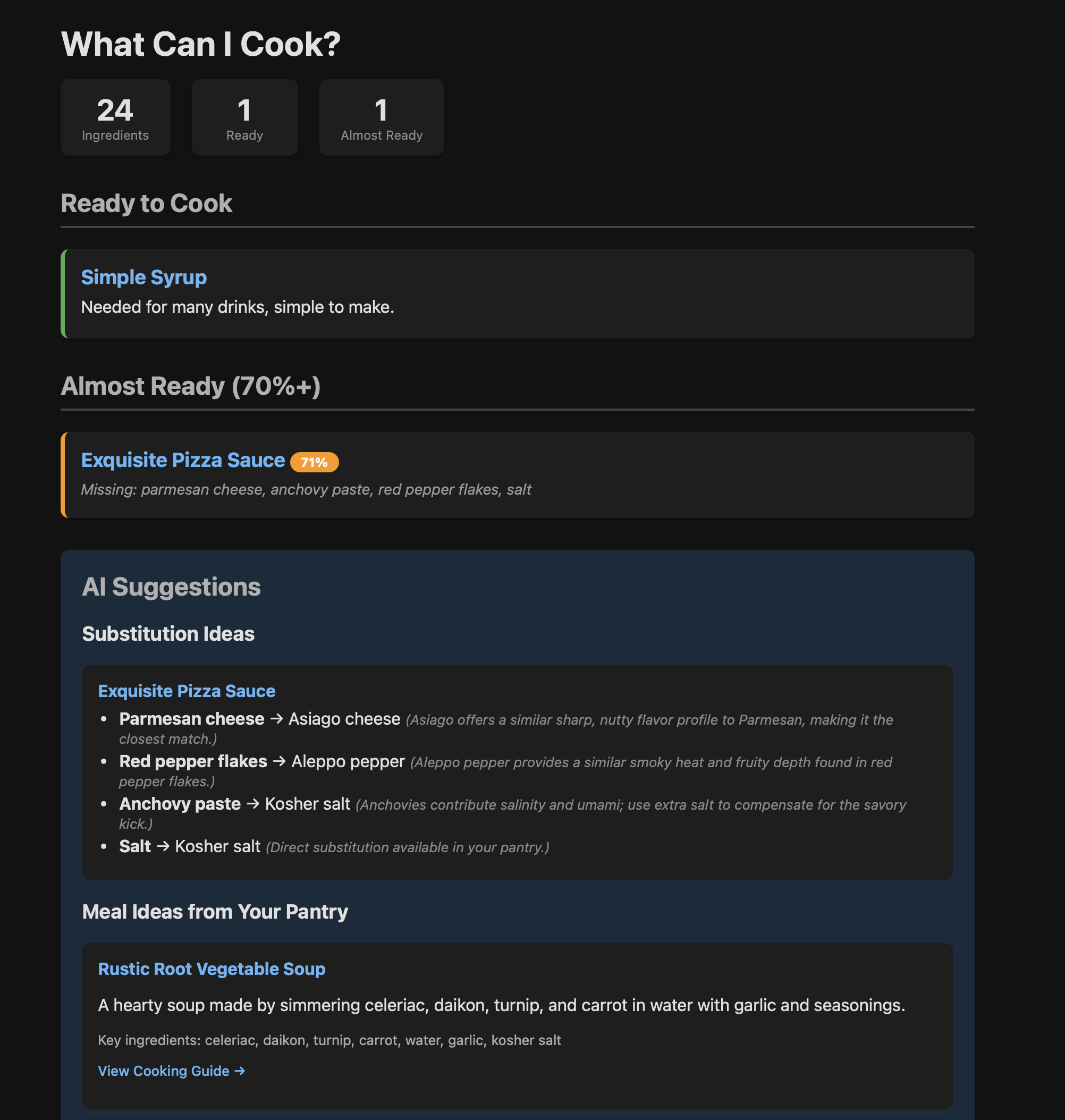
Simple syrup sounds like a declious meal, don't you think?
So before you call out the obvious, let me be clear - both the pizza sauce and the simple syrup recipes are recipes from my Mealie database. They aren’t generated recipes.
Either way, this gives us a few ideas! There are three meal ideas generated, which I’ve cut off here just for space (The other two, if you were curious, were ‘Creamy Asiago Pasta’ and ‘Honey-Glazed Steamed Vegetables’).
“Wait!” I hear you say. “You said something about a cache. How often are those recipes refreshed?” Never, really. There’s no TTL. “So what if you DO change one?” Good question! At the bottom of the page, there’s a quick and handy little button to handle that for us:

Big red buttons usually mean bad things. Should we click it?
Clicking that will clear out the cache and reload the page, forcing the recipes to all be downloaded fresh. I expect to hit this button maybe once or twice. Total. After all, new recipes are downloaded automatically, and how often do you go back and change the ingredients in a recipe you already have?
So yeah, we’ve got some ideas, some substitutions if we wanna try to make the pizza sauce with Asiago instead of Parmesan, and a few meal ideas. But what’s that “View Cooking Guide” button do? This!
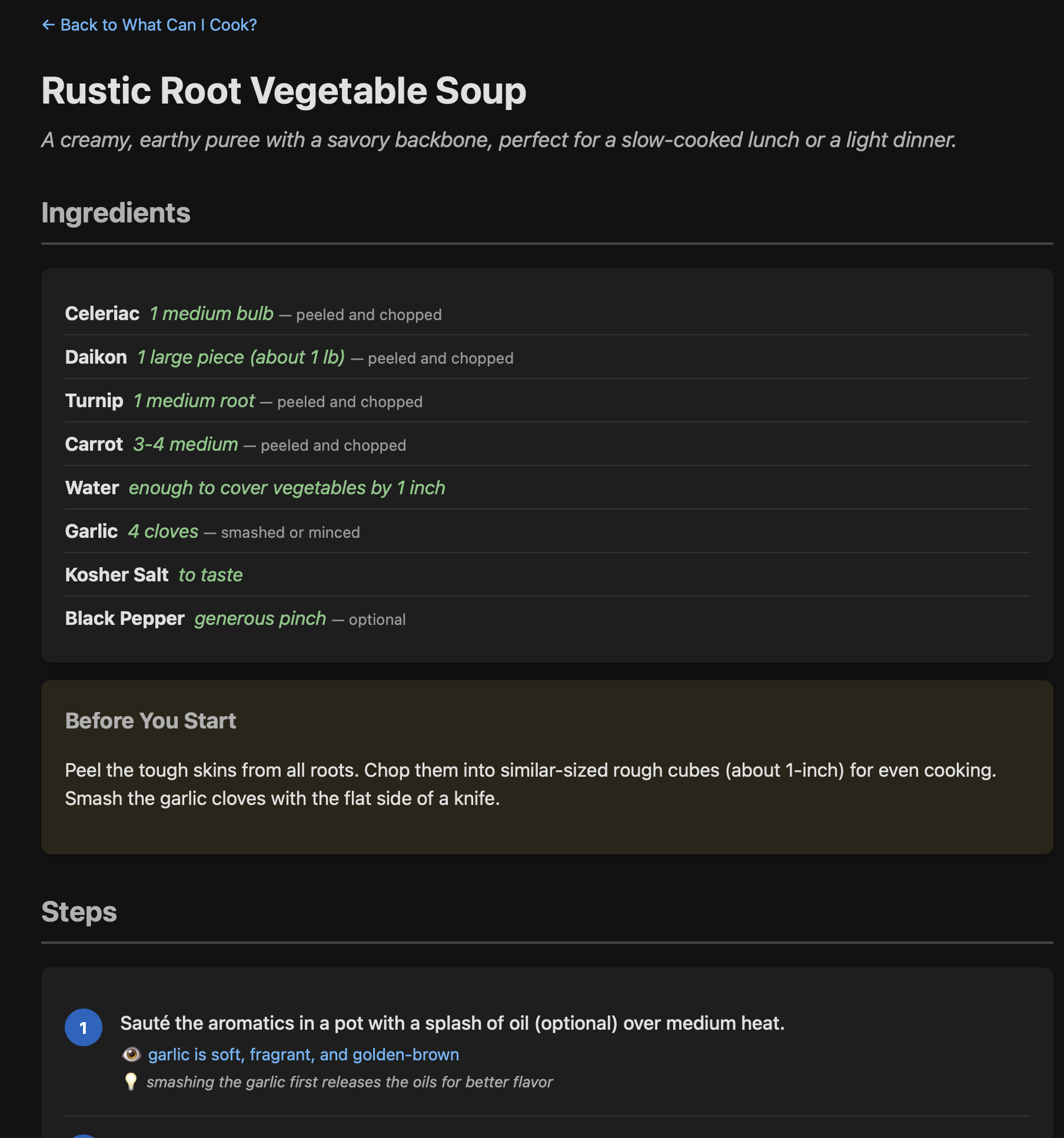
Doesn't that sound good? I would probably toss some ginger in too, personally.
That’s exactly what we’re looking for. Maybe even a little too much detail. We don’t need a lot of handholding, just a list of ingredients with some suggested amounts, and high-level instructions telling us what to look for - we’ll use NI (Natural Intelligence) to figure out the rest, and to make sure the steps are reasonable as we go.
But wait, is there anything in this recipe I should be watching out for that I’m not thinking of‽
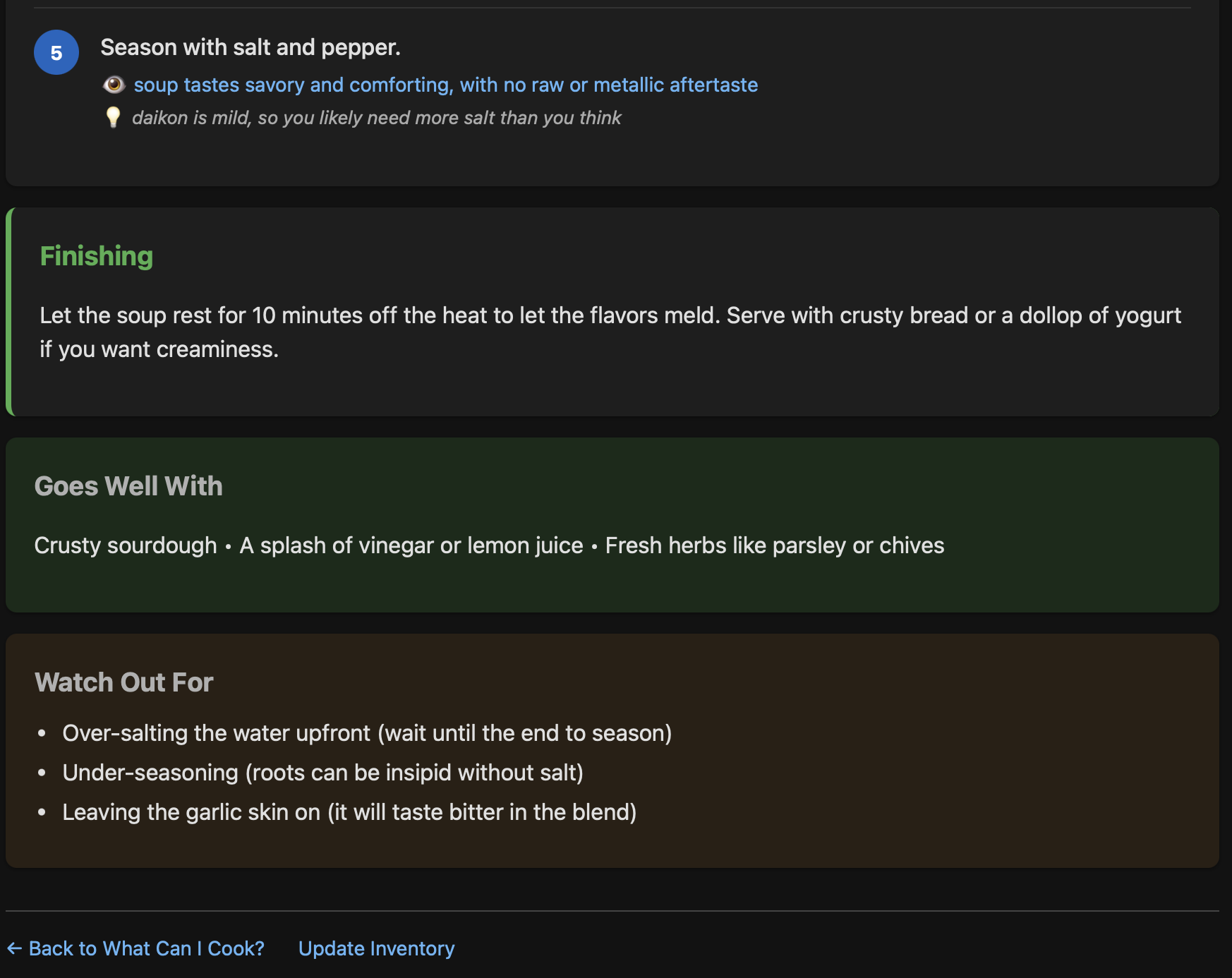
You never want to under-salt your daikon, no sir.
Just a few things, it looks like.
So there we go, with just a few clicks and a little bit of waiting on a little Mac Mini to spin its wheels, we’ve at least got something we can make with whatever we have in the fridge. Any problems?
The Good, The Bad, and The Knobby Celery Root
The tool seems to work quite well! I’m still building it out, so I can’t say in good faith we’ve used it yet, but the end result is very similar to what my partner and I have been doing with ChatGPT and Claude for a while, so I suspect we’ll make a lot of use of this over time.
I’m quite impressed with GLM 4.7 Flash as well. The end results are nearly as good as what I’ve been getting out of the big cloudy LLMs in this context, and all I have to pay for is my own electricity, not any token costs. Not bad!
But not everything is good, of course. There are really just a few major flaws, but none of them dealbreakers. The first is that sometimes, the page will just…not load. It’ll sit there, the LLM will do its thing, and then…nothing. What’s happening here is that the LLM is doing what LLMs do - nondeterministic responses. The workflow expects a JSON formatted response from the LLM, and if the LLM doesn’t respond in a way that perfectly conforms to the expect spec, well…that page load just stops. At least I didn’t waste any tokens on it…
The second I’ve kind of tip-toed around, but using a local AI model, especially on a Mac Mini without any discrete GPU, is sssssllllloooooowwwww. Very slow. Any time the LLM is called on, the page load will be at least 1 minute, if not 2. Fortunately we’re not dealing with any timeouts, but that wait is annoying. There are some ways to solve - cloud models - or mitigate - AJAX replies - the problem, but it’s not a big enough deal at this point to put the effort into fixing it.
Finally, the results can be hit and miss. Generally speaking they’re pretty good! But every once in a while I’ll get something and think, “That’s a dumb idea.” For example, a Basil and Lime Mocktail. Sure, that actually sounds delicious and like something I’d like to try, but this thing is meant to give me meal ideas, not just recipe ideas.
Basically, the problems are all of the regular ones you can expect with LLMs: speed and nondeterminism. For a low-stakes application like this one, though, not anything that’s worth getting up in arms over. It’s so low stakes in fact, I had no issue letting an LLM do most of the work.
Go, Monkey, Go! Mo-jo-jo-jo!
Claude Code built this tool, mostly. I just told it what I was looking for. How did it turn out? Fine! There are some rough edges to be sure, especially in the CSS, but the end result is usable and hits all of my base requirements. In the end, this took about 3 or 4 days to go from “a hope and a dream” to “the tools are deployed and the MVP is working.” Is it maintainable long term? We’ll see, javascript is not my forté, but I’m happy for now.
I’ve been using Claude Code for several months now for lots of different uses. My previous job was strongly encouraging everyone to utilize AI as much as possible to help with their work, though unlike many horror stories I’ve heard (cough cough Microsoft cough) they at least didn’t require it. I’ve also sicced LLM coding agents on various little problems in my personal time, like a wall-mounted kindle smarthome dashboard with Codex, or something to help track my anime watching on Anilist also with Claude Code. This was just another one of those.
I did experiment more with this one then with others, though. For starters this is mostly n8n workflows, which means it’s less “coding” and more “plugging things together,” though as you can see it wrote a lot of javascript along the way.
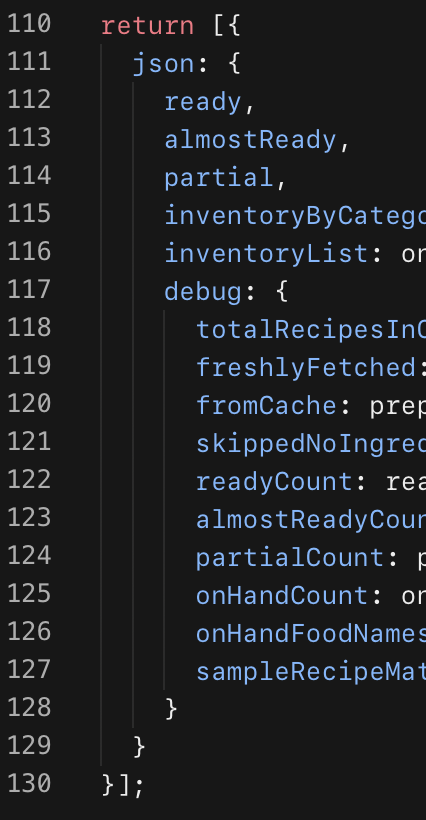
130 lines for one node. 15 code nodes total.
I also played around with which model to use. My timing was interesting, I started this project with Opus 4.5, but Opus 4.6 came out mid-project. I also tried Sonnet 4.5. My results:
- Opus 4.5 was pretty good. A few mistakes, not bad, but I hit my limits occasionally.
- Sonnet 4.5 was surprisingly bad, considering the success I’ve had with it before. I had Opus build a PRD for it, so I was really surprised, but it kept blowing up the workflows.
- Opus 4.6 was shockingly good. It basically one-shotted each workflow with only minor adjustments needed. That said, I hit my limits constantly. Incredibly annoying. In at least one instance I gave it a single prompt before hitting my limits.
One more experiment was using Claude Code via Claude Desktop instead of via the CLI, and I will say that it’s a bit more cumbersome that way. I prefer Claude Code in the CLI, but I prefer Chat with Claude Desktop. Good to know, I suppose.
What about the other LLMs? I do also subscribe to ChatGPT, but I didn’t really feel like using Codex this time around. I don’t subscribe to any others, but I might give them a try sometime. We’ll see.
FutureFood
I’ve got some more plans for this tool, some of which I’m (using Claude to be) working on right now. Let’s talk about them! …No punny headers here, I’m punned out for these.
MCP
You know what would be really nice? If instead of relying on a super slow mac mini, we can just use our existing subscription to Claude or ChatGPT and just have one of them “know” all of the ingredients we have, so we can just ask in a chat. Turns out, the desktop versions of both support MCP servers!
While we lose the benefits we had with using a local LLM, we gain in faster and better models that are updated more frequently. Plus, we don’t have to go to a bespoke interface to do anything - we just ask the LLM from a MacBook and it’ll figure things out for us. As far as context bloat goes, we’ll only be exposing 5 tools - 3 for recipes, and 2 for ingredients, which should mitigate the well-known bloat issues caused by MCP servers.
Claude is hacking away on an n8n workflow for this right now. For its part, n8n supports MCP servers as a workflow natively.
Weekly Planning
We only get our CSA every two weeks, so why should we figure out what we’re making every single night? Let’s generate a list of options for the whole week and - critically - automatically update our calendar with what meals we’re making, as well as reminders a day or two before to pull things out of the freezer to defrost. That’s the point of knowing where food is stored: making sure it’s prepped in time for actually making the meal. Not very useful to have a suggestion for fried chicken if all of our chicken is frozen solid, after all.
Tagged Recipes in Mealie
Notice anything weird about those screenshots? Say, for example, why are “Simple Syrup” and “Pizza Sauce” recipes being suggested at all? Right now the tool is just taking everything in Mealie as options, but Mealie does have the concept of tags. I would like to simply update the recipe gathering steps to only gather recipes as either tagged good for this workflow or not tagged bad against it - I haven’t decided which. Basically, tag, say, “Okonomiyaki” as “suggest this” or “Simple Syrup” as “don’t suggest this”. I haven’t picked a direction here yet.
Ingredient Suggestions
Finally, what happens if we flip the script? We have an inventory of everything in our kitchen, but are there any staples or common things we don’t have that we should, particularly things that would open up a much wider range of recipes and ideas? It would be great to have a selection of ingredients so we can make even more different kinds of food!
Where’s the Dish?
So in the end, right now, we’ve got a complex combination of multiple tools and services - Mealie, n8n, Ollama, and others - to effectively let us know if it’s a beef or fish night tonight.
And you know what? I think that’s cool.
Is it an overcomplicated house of cards that could come crashing down if any one thing changes during an update? Absolutely. But does it reduce the amount of thinking my partner and I have to do after a long day at work? Also, absolutely. The added load of keeping up with the inventory is minor, all things considered, because we only care about “we have it” or “we don’t,” exact amounts, brands, varieties, etc. aren’t really considerations for us, for now.
Is the amount of time I spent putting this together ultimately going to save me more time in the end? No, probably not in this case. I learned a lot about n8n in the process, though! Mealie, too, I guess, but I don’t think that’s going to be as useful for me in the long run.
And you know what, for the most part, I had fun putting it together, and that’s really what matters.
Now then, eat up.
Blog Notes: Is that a comet?
No, “comment,” not “comet,” geez. Stupid jokes aside, I’m investigating ways to integrate comments and read counts into the blog. If you know me, ping me ideas! I’m listening. I don’t want to set up your bog-standard database-driven system, this blog is all static and I like it that way. I’m not a fan of the idea of using something like Discourse either, so that’s probably out too. I found a HackerNews Post about doing this with Bluesky, but I wonder if there are better ideas out there since I don’t hang out on Bluesky at all, ever (I gave up on Mastodon, too). Lemme know what you think!